Showing posts with label linux. Show all posts

Friday, October 21, 2011

Bash scripting: parallel process control with 'bash' and 'xargs'


I have been attempting to run bash commands in parallel on Windows with bash given by msys with some form of control over the number of processes spawned. With this setup I do not have access to the parallel command.

For example, we can always specify the number of processes for compilation to the make command using:

$ make -j4

that uses 4 parallel processes and no more. After much trial and error, I finally figured out how multiple arbitrary commands can be run in the same way with a similar kind of control.

Let us presume we have a command file with one line per command. For example, I am trying to build different machine learning models to predict outcomes on various datasets in parallel on a multi-core machine using WEKA. Hence I have a text file, cmd.txt, prepared by a script that contains lines like:


$JBIN -Xmx3g weka.classifiers.trees.J48 -C 0.25 -M 2 -A -i -t result-1-1/filter6-weka-train.arff -T result-1-1/filter6-weka-test.arff -p 0 -d result-1-1/filter6-J48.model > result-1-1/filter6-J48-report.txt
$JBIN -Xmx3g weka.classifiers.functions.LibSVM -S 0 -K 2 -D 3 -G 0.0 -R 0.0 -N 0.5 -M 1000.0 -C 1000000.0 -E 0.0010 -P 0.1 -Z -o -i -t result-1-1/filter6-weka-train.arff -T result-1-1/filter6-weka-test.arff -p 0 -d result-1-1/filter6-SVM.model > result-1-1/filter6-SVM-report.txt
$JBIN -Xmx3g weka.classifiers.functions.LibSVM -S 0 -K 2 -D 3 -G 0.0 -R 0.0 -N 0.5 -M 1000.0 -C 1000000.0 -E 0.0010 -P 0.1 -Z -W '1 2' -o -i -t result-1-1/filter6-weka-train.arff -T result-1-1/filter6-weka-test.arff -p 0 -d result-1-1/filter6-SVM-w-1-2.model > result-1-1/filter6-SVM-w-1-2-report.txt
$JBIN -Xmx3g weka.classifiers.functions.LibSVM -S 0 -K 2 -D 3 -G 0.0 -R 0.0 -N 0.5 -M 1000.0 -C 1000000.0 -E 0.0010 -P 0.1 -Z -W '2 1' -o -i -t result-1-1/filter6-weka-train.arff -T result-1-1/filter6-weka-test.arff -p 0 -d result-1-1/filter6-SVM-w-2-1.model > result-1-1/filter6-SVM-w-2-1-report.txt
$JBIN -Xmx3g weka.classifiers.trees.J48 -C 0.25 -M 2 -A -i -t result-1-1/filter9-weka-train.arff -T result-1-1/filter9-weka-test.arff -p 0 -d result-1-1/filter9-J48.model > result-1-1/filter9-J48-report.txt
$JBIN -Xmx3g weka.classifiers.functions.LibSVM -S 0 -K 2 -D 3 -G 0.0 -R 0.0 -N 0.5 -M 1000.0 -C 1000000.0 -E 0.0010 -P 0.1 -Z -o -i -t result-1-1/filter9-weka-train.arff -T result-1-1/filter9-weka-test.arff -p 0 -d result-1-1/filter9-SVM.model > result-1-1/filter9-SVM-report.txt
$JBIN -Xmx3g weka.classifiers.functions.LibSVM -S 0 -K 2 -D 3 -G 0.0 -R 0.0 -N 0.5 -M 1000.0 -C 1000000.0 -E 0.0010 -P 0.1 -Z -W '1 2' -o -i -t result-1-1/filter9-weka-train.arff -T result-1-1/filter9-weka-test.arff -p 0 -d result-1-1/filter9-SVM-w-1-2.model > result-1-1/filter9-SVM-w-1-2-report.txt
$JBIN -Xmx3g weka.classifiers.functions.LibSVM -S 0 -K 2 -D 3 -G 0.0 -R 0.0 -N 0.5 -M 1000.0 -C 1000000.0 -E 0.0010 -P 0.1 -Z -W '2 1' -o -i -t result-1-1/filter9-weka-train.arff -T result-1-1/filter9-weka-test.arff -p 0 -d result-1-1/filter9-SVM-w-2-1.model > result-1-1/filter9-SVM-w-2-1-report.txt


where $JBIN is an environment variable that points to the java bin. Now to run these in parallel but with a limit on the number of processes, use the xargs command to split the input lines as follows:

$ cat cmd.txt | xargs -0 -d '\n' -L 1 -I {} -P 3 bash -c "eval \"{}\""

The options used are:

  1. -0 to retain quotes in the input line and presume arguments are terminated as \0 characters
  2. -d '\n' to set newline as the delimiter between arguments, overriding \0 in the previous point
  3. -L 1 to read one line at a time
  4. -I {} to set parenthesis as a replacement string to substitute the argument read, in this case an entire line
  5. -P 3 to limit to a maximum of 3 processes
  6. bash -c "eval \"{}\"" to execute the substituted command within bash
And that is it. It works as long as the commands are on a single line. I have yet to test it on commands spanning multiple lines.

Monday, May 11, 2009

Ubuntu 9.04 AD1986A snd-hda-intel driver

I had reinstalled my desktop with the latest Ubuntu 9.04. As usual, the on-board sound of my ASUS P5GL-MX registered as AD1986A does not work correctly with the snd-hda-intel driver. The line-in jack picks up no sound. The reason, after much searching a few years ago, had to do with the wrong number of audio I/O jacks being recognised in the default kernel module settings for the driver. To solve it, add the line:

options snd-hda-intel position_fix=1 model=3stack

To the end of the file:

/etc/modprobe.d/alsa-base.conf

Reboot and now line-in sound works like it should.

Monday, February 16, 2009

That Asus EEEPC 1000H


I finally decided to get a netbook. It started with wanting to get a good PDA phone. Then, I realised there are some things that seem hard to do on those. Further then, I realised that no phone sized mobile phone was going to compile C++. Last, I realised that if I am not going to do those things, at least it should run a SSH client.


The Nokia e66 makes the cut with wifi and Symbian OS that thinks it is windows but works better. Here it runs the Symbian port of the putty SSH client, connected to the ASUS eeepc 1000H that I just obtained awhile ago as well.

Unfortunately for me, I decided to order my eeepc from VPOST. A terrible idea. First, it was out of stock and they did not bother to inform me. Second, after asking them when will stock arrive they initially gave me an indefinite answer. Imagine paying for something that might never come. Then, there was the big mess up with the delivery. They had a arrangement service that you could re-arrange a new delivery date if the first was missed. Funny thing is, they disregarded two rearrangements that they agreed to, causing much distress, and delivered when they pleased. They should just go back to doing mail and not expect customers to pay $698 and treat it as if they were sending snail mail.

Next came the delight with the new little thing. Not too small, but light enough for me. Intel Atom processor clocked at 1.6GHz, 1GB RAM, Wireless N, Bluetooth, 160GB HDD, multi-touch pad ("Blasphemy!" screams my brother who belongs to the cult of Mac).


Starting up WinXP home, I wanted to swap the HDD with my 320GB external but was too lazy in the end. I got to remember to remove those ugly metal stickers.


The only point of WinXP home is to install Visual Studio and start compiling away. Works perfectly! The next thing to do, install Eeebuntu, a customised Linux distro for the eeepc.


Firing up the live image from USB and installing.


Install done. With Intel integrated graphics having excellent linux support, 3D desktop (compiz) works like a charm. In fact better than my desktop with ATI that doesn't get it right. What to do next?


Install the best open source game, Battle for Wesnoth


The best not really free open source game, Open Transport Tycoon Deluxe


Play some arcade with MAME

Curious about the Intel Atom, I decided to list the cpuinfo using the command "$ cat /proc/cpuinfo" which showed two processors. After checking it up, it seems that it is due to Hyper-threading on the N270. That makes two processors when counted with the integrated graphics.

Then, I realised something bad. One of my instant key buttons that is supposed to toggle between various resolutions does nothing when pressed. I hope this doesn't mean a lengthy trip to the service centre, sigh...

Sunday, January 25, 2009

Mencoder v4l2 - Solving the crackling noise in audio when recording from tv card


One of the few things that I could not get right for many months on my Ubuntu Linux installation is the ability to record television programmes from my low end Hauppauge WinTV-PCI-FM card. Playback was excellent using tvtime, in fact it was better than playing back on Windows using the manufacturer's software. However, whenever I tried recording TV using mencoder (that comes with mplayer), an obvious crackling/clicking noise was always present in the audio stream. This was a shame as the video recording offered higher quality than what I could record using Windows. Furthermore, I was able to directly record into any format that mplayer was capable of playing.

The command I used is shown below, it outputs the tv card's composite video and audio into the file, test.avi. Thinking it was something to do with my audio sampling settings, for months I was twiddling with the command used for recording to no avail by adjusting the both the sampling rates (in red below) between 38400Hz, 44100Hz and 48000Hz. In short, I was recording using PAL-BG encoding from the television signal with sound coming from the first alsa sound driver device (adevice=plughw.0,0). Read more about the various options here

$> mencoder -tv norm=PAL-BG:driver=v4l2:width=768:height=576:input=2:alsa:amode=1:adevice=plughw.0,0:audiorate=48000:volume=0:immediatemode=0 -af resample=48000:volume=-5:1 -oac mp3lame -lameopts preset=medium:vol=0:highpassfreq=0:lowpassfreq=0 -ovc lavc -lavcopts vcodec=mpeg4:vbitrate=1200 -vf harddup,crop=720:544:24:16,pp=lb -noskip -ffourcc divx -o test.avi tv://

No matter how many audio filters I applied, I could never remove the crackling noise from the audio stream. Finally, after talking to my dad about how crackling noises may enter recorded audio streams due to too high a sampling rate, I decided to lower the sampling rate from the raw audio input stream differently. Where previously I adjusted the sampling rates between only 38400Hz, 44100Hz and 48000Hz (the only values accepted by the lame audio encoder), I decided to sample the input audio stream at a slightly lower rate and then resample the stream to be acceptable to the lame audio encoder as shown below. The sampling of the audio input is set at 47950 but to be resampled to 48000 for the encoder.

$> mencoder -tv norm=PAL-BG:driver=v4l2:width=768:height=576:input=2:alsa:amode=1:adevice=plughw.0,0:audiorate=47950:volume=0:immediatemode=0 -af resample=48000:volume=-5:1 -oac mp3lame -lameopts preset=medium:vol=0:highpassfreq=0:lowpassfreq=0 -ovc lavc -lavcopts vcodec=mpeg4:vbitrate=1200 -vf harddup,crop=720:544:24:16,pp=lb -noskip -ffourcc divx -o test.avi tv://

To my surprise, that was it. All the irritating crackling noise disappeared! I can now put the command into a bash script for scheduling the recording of my television programmes in better quality and more flexibility than I can on windows.

Monday, June 23, 2008

Are the pictures blur?

It seems that quite a few of the pictures on my posts to Japan are blur. They were resized using F-spot -- the gnome photo management software. Looks like they are automatically saved with low jpeg quality. So much for saving time from using Photoshop's batch mode.

After some searching on the web, it seems that I missed the resize functionality in Picasa. While not as convenient as F-spot (that can resize and upload in one step), it allows you to control the jpeg quality of the resized files. I will probably be trying this out and replacing some pictures, so check back if you see a post with the pictures missing -- I am probably editing the post.

*** UPDATE ***
Indeed, F-spot's resize on upload sucks. I am updating each and every post's images with the Picasa resized ones -- well not all, the more scenic ones... grrr...

*** UPDATE 2***
Re-resized, uploaded and updated most of the blur pictures for the Japan trip. Now that took long...

Friday, May 30, 2008

Desktop Sharing Securely with VNC from WinXP to Ubuntu

I decided to setup two old computers lying around my office today. One already had Ubuntu 7.04 (Feisty Fawn) installed while the other was running WinXP. So I wiped the WinXP off one, and distro upgraded the other to Ubuntu 8.04 (Hardy Heron). Now I have two Hardys sitting on an office bench. I primarily work with a dual-screen WinXP machine with remote desktop to another WinXP machine somewhere else. Then it dawned on me that instead of using ssh to issue text commands to the two Hardys, it will be great if I could do remote desktop to them and control all 4 machines.

It turns out that the simplest way was not a proper remote desktop like how WinXP does its remote desktop but rather, desktop sharing using VNC that comes with Ubuntu. What happens in desktop sharing is you send inputs to the remote computer which sends you back the output. The input is taken to occur on-site, i.e. moving the mouse on the remote side actually moves the pointer on the actual machine. Unlike a proper remote desktop, desktop sharing with VNC is inherently insecure. This is primarily why I refer to it as remote sharing instead of remote desktop (note that in the System menu it is under "Remote Desktop").

Firstly, for remote sharing, after enabling it, a remote user can only connect to the desktop if a user is logged in on site. This means that a computer in an insecure physical location will never be secure as someone can sit down in front of it, stop the remote sharing, and start using the system in place of you. Contrast this with remote desktop in WinXP where the computer will be locked by the remote user on-site. Hence only someone with your user account can hijack the computer physically. Fortunately for me, both computers are in a secure physical location so this is not a problem.

Secondly, the password that one sets for remote sharing is only 8 characters long and there is no prompt for a user account. This means that the security of a user account is now only 8 characters since someone can log in remotely as well and change the on-site logged in user's password.

Lastly, for the free version of VNC, data exchange after logging in is not encrypted. That means any password sent can be sniffed over the network directly.

The solution to the last two problems is to use ssh tunneling and a firewall (or host denying). Indeed there are quite a few a articles online on how to achieve this, one of it being here. The gist of it is, one creates a secure ssh connection to the remote machine, use ssh tunneling to tell the remote machine to forward a connection to itself (on the VNC port), then, connect to desktop sharing through this secure tunnel. For example when connecting from A to B, an encrypted tunnel is set up from A to B and a unencrypted one from B to itself. The latter is fine since no data actually leaves the network interface. Then, to stop others from making a remote sharing connection, either only allow the local host (i.e. B) to remote share to itself or use a firewall to block incoming connections to the remote share port. I used a firewall since the GUI option to ``allow local connections only" for remote sharing did not work for me and I was too lazy to manually edit the configuration files.

The net effect, now connecting to a remote computer requires logging in to it using ssh which makes the connecting password of 8 characters immaterial -- it is now as strong as your normal user account. Furthermore, no one can easily snoop on data you send over the network as it is encrypted, plus no one can access remote sharing directly without using ssh tunneling.


Tada! Controlling 2 WinXP machines and 2 Ubuntu boxes with one computer! But VNC is quite sluggish even when the machines use the same network switch and this still does not solve the physical insecurity problem. To do that we probably need real remote desktop. In Linux I think this means having an X-server on the WinXP machine via cygwin and logging in to the linux box using XDMCP. This gives the remote user a dedicated desktop, i.e. all actions are private to the user, instead of being shared on-site. The remote computer can be left at the normal log-in screen so no one without the proper privileges can hijack someone's user account on-site.

Alternatively some online HOWTOs seem to advocate FreeNX to do this which I believe is distributed from here. However, it might not be the best solution if the goal is to minimize computation on the remote client (i.e. the machine you are at) since the GUI computation is now done on it. ``SO why not just use normal ssh?", you ask. Well sometimes I forget the names of packages that I want to install and Synaptic helps me find them better than apt-get.

* * * * * Update * * * * *
Decided to give NoMachine NX a spin. It is easier to configure than VNC, handles all security problems and creates a separate X-session for each remote login. It does this, I believe, by having an x-server and using ssh for the connection. Get it from their website.

Monday, May 19, 2008

Arcade Joystick with MAME on Ubuntu 8.04 LTS

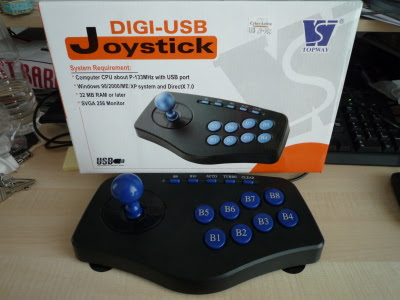
Today, I saw a cheap China made USB arcade stick at the computer store near my home. Previously I was contemplating buying the Japan made Hori Fighting Stick that will set me back a good $80. Luckily, this stick appeared for just $29. It is a Digi-USB Joystick from Topway and it says Windows 98 to XP on the front. Flipping to the back says "2002 Topway all rights reserved". Being something from 2002, it sounds like a good bet it will work in both Linux and Windows so I bought it and plugged it into my computer running Ubuntu 8.04 LTS. Typing $ sudo dmesg I found the stick was detected as being:

USB HID v1.10 Joystick [GreenAsia Inc. USB Joystick] on usb-0000:00:1d.0-2

And that it was a low speed USB 1.1 device. Not that I needed USB 2.0 anyway. Firing up MAME 0.135 I tried it with Marvel vs. Street Fighter. The GreenAsia Inc. driver in Ubuntu worked flawlessly. Physically, it does not have as good a feel as an arcade stick but it is decent enough to perform all air combos. Great! I finally have a decent fighting stick that works right out of the box. Being a light stick, one nice addition is the four sucker pads on the base of the stick that keeps it in place on the table top.


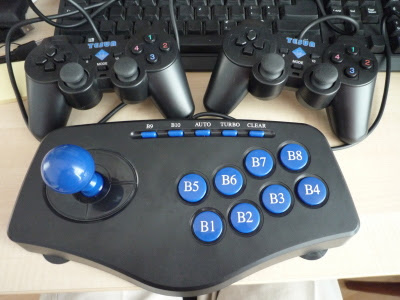
With 8 buttons, you can configure your favourite layout (American or Japanese) for the common six or four fighting buttons.


My desk is getting rather cluttered with the Tesun dual gamepads and this new joystick.


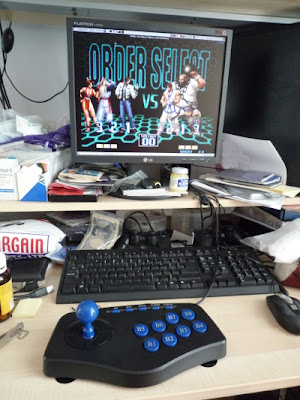
Here we go, King of Fighters 2002 on MAME 0.135!

Sunday, May 11, 2008

Ubuntu 8.04, MAME & AIGLX on ATI

With Ubuntu 8.04 LTS out for a few weeks now, I finally finished my exams and decided to give it a spin. Downloaded an alternate CD to upgrade my Ubuntu 7.10 from. Unfortunately it failed. It was only later that I realised it was due to my Mythbuntu installation. Should have downloaded the Mybuntu alternate CD instead. Thankfully, the servers were up and a net upgrade quickly placed 8.04 on my PC. Some problems still not resolved though (but not really the fault of Ubuntu). For starters, AIGLX is still working,


But sadly playing videos and watching tv using tvtime with XV still fails in windowed mode due to problems with the ATI drivers. The best I could get is flickering videos. But it is not stable. After messing around with some Compiz settings, it is possible to lose video altogether.


F-spot seems slightly less buggy. Next I decided to install the latest version of SDLMAME v0.125 from here (forget xmame, the base version of mame is too ancient). It didn't work right at the start using opengl rendering and I had to edit "/etc/sdlmame/mame.ini" to set option "gl_pbo 0" before it would run.

What delighted me the most is my Tesun USB-706D Dual Analogue Joypads (looks like PS gamepads, two pads hooked to one usb plug) that I bought for $23 worked right out of the box without additional drivers except for the vibration (not that it mattered). Unfortunately, with Compiz and the ATI fglrx 8.47.3 drivers, the display flickers like videos and tvtime. Hence I had to postpone my eye-candy yet again till ATI gives better drivers. Oh well, back to metacity.


Marvel Vs Street Fighter! It's been a long time.


Dungeons & Dragons 2: Shadows Over Mystara! Used to be stuck in the arcade for 4 hours with my friend trying to finish this with one or two coins. It takes about 1.5 hours to complete the game. So far everything seems alright with 8.04, I have no idea why they packaged Firefox 3 Beta 5 though. Broke some of my extensions but it does have some cool features. Other than that there's nothing really visibly special.

Thursday, March 6, 2008

JVM Max Heap Size on WinXP 32-bit

I have been trying to run some memory intensive java program on a WinXP Pro system with 2gb of RAM. Unfortunately, I could never reserve more than 1.4gb of memory on it for the JVM heap (using -Xmx). Frustrated, I turned to a 32-bit Linux server on Fedora Core 5. To my surprise, I managed to reserve 1.8gb. It appears that on 32-bit systems the maximum one can reserve is slightly less than 2gb and because of OS constraints, different OSes (hence different JVMs) have different limits on max heap size. WinXP Pro only allows from 1.4gb to 1.6gb. Anything more than 2gb requires a 64-bit machine as stated in Sun's FAQ here.

Tuesday, February 12, 2008

Warcraft III Frozen Throne on Ubuntu 7.10

*** UPDATE ***
Unfortunately, multi-player is broken in wine version 0.9.46, and the whole game is broken in 0.9.55. Version 0.9.51 works but hosting is broken, only joining games is possible. Alternatively, use 0.9.45 as suggested by this ArchWiki site.
**************

Since Ubuntu 6.06, I have been able to play Defense of the Ancients in Linux with the support of the WINE compatibility layer. Recently I have decided to get Warcraft III working on 7.10 as well. The steps are simple. First, install WINE using Synaptic as shown below.

The version at the time of my installation is wine-0.9.46. Then set the settings for video and audio using the wine configuration tool. The settings I used are shown below.

Then, create a launcher on the panel. Note that the -opengl option should be used as shown in my configuration below. Also, I am using a NO-CD exe (alternatively, the latest update for Frozen Throne does not require the CD or so I read somewhere online). Since I cannot find a Frozen Throne icon online, I decided to use the one for World of Warcraft available here.

That's it! Now I can play DotA!

Tuesday, December 25, 2007

Ubuntu 7.10 Gutsy Gibbon

After a long while, I finally decided to upgrade my linux installation to the latest Gutsy Gibbon -- touted as a big step forward with its ease of installation. Furthermore it is now possible to write to NTFS partitions and it is always great to have a backup OS especially in case Windows messes up. Popping in the live CD, and rebooting, I was greeted by the simple desktop from which I can play around with or install to hard drive.


Starting the install process, I was given an intuitive screen to choose my location.


Next I decided to manually choose which partition to install ubuntu on.


There is an interesting new feature that is able to import WinXP users profiles to your linux user.


Proprietary drivers where required, such as Nvidia and ATi card drivers, are automatically prompted to the user for download and installation. Another nice feature is that when playing proprietary codecs such as mp3, the player will prompt the user to automatically search for the required codec. After running a system update, I proceeded to grab the standard programs that I commonly use, like the tetex latex engine, video lan client, etc, using the Synaptic package manager. For those unfamiliar, linux distributions maintain software repositories (repos) from which you can grab common software from with a few clicks. Of course it is also possible to download them off a webpage and install them. Something that I had to do for adobe's flash-plugin for Firefox since the version in the repo was corrupted.

Everything works more or less okay with the exception that I had to edit some configurations for my sound card driver to get my line in to work. For the first time, I actually managed to receive tv on my tv tuner using tvtime. So I proceeded with the juicy part. Getting 3D desktop effects to work. This was now supposed to be as simple as flicking a switch in the Appearance configuration screen. Apparently, with all the advances in this area, using ATi cards still suck for 3D effects on linux. Firstly, I had to go through some steps to install the latest ATi drivers from AMD because at the time of Gutsy's release, ATi drivers did not support AIGLX (something used to render the effects). The 3D effects seem quite slow for my machine. Probably something to do with AIGLX (it was fast previously under Xgl) or not so good ATi drivers. Then, the other downside is that videos can only play in full screen mode. Again this is somewhat a regression from my previous Xgl enabled system. Nevertheless, the Compiz window manager does give some cool effects and if these issues can be tidied up, the desktop is clearly far superior to what Vista provides. Below we have a application switcher in action.


This auto-tiling feature to select the application you want is similar to what OS-X gives. You might notice Picasa. It works for linux but currently uploading to the web albums do not work on the stable version. That is only available on the latest beta 2.7 version of Picasa.


The wall allows you to drag windows from one desktop to another.


Finally, it is always nice to see your desktop raining.


Ubuntu 7.10 Gutsy Gibbon has come a long way since 6.06. But sadly, if 3D effects are desired with ATi cards, configuring these will probably turn off many. Otherwise, most things work nicely out of the box.

Monday, July 23, 2007

$100 human powered laptop

Well not quite $100 (yet), more like 100 pounds. An interesting scheme to get laptops to children in developing countries -- these things can even be powered by foot-pump. Some very big names are involved in it, including Intel, AMD, Google, etc. Although Intel is involved, the laptop will run on AMD processors for now. Since RedHat is involved and since you cannot find a supported version of Windows for under $100, my bet is it will run on the Linux operating system.

Some updates: there is a full run down of the laptop's specifications and capabilities here and some Nigerian children have already found something that inspires them to "foot pump" their laptop more (pointed out by a friend of mine).

Thursday, March 1, 2007

Decent writing to NTFS partitions in Linux

Been waiting for this for a long time. Basically writing to New Technology File System (NTFS) in Linux was considered unsafe. This is due to the fact that the open source developers had to reverse engineer Microsoft's NTFS file system. Finally there is a driver that can write to NTFS safely. It is released here. Not all features of NTFS are ready yet but there is one interesting thing -- you can now install Linux into an NTFS partition. In other words, you can access the Linux partitions from Windows in a dual boot system instead of installing some 3rd party ext2 and ext3 (file systems that Linux commonly uses) drivers for Windows.